 how-to
7 Steps to Create a Focus-Friendly Workspace
Last Updated: October 24, 2026
Quick Summary
To create a focus-friendly workspace, pick a spot away from foot traffic, the TV, and the kitchen, then split your space into zones for deep work, calls, and breaks. Get the location, layout, light, and sound control right, and focus stops being a willpower problem.
- Set your screen's top edge at eye level and keep feet flat with elbows near 90 degrees.
- Keep everything you touch daily within arm's reach and clear the desk surface each day.
- Turn off every alert that isn't a call or calendar reminder, then block two or three deep work blocks.
- Place the desk perpendicular to the window so light falls across it, not into your eyes.
- Run a two-week test, changing one thing at a time and keeping changes that lengthen focus blocks.
Table of Contents
- Step 1: Pick the Right Spot and Plan Your Work Zones
- Step 2: Build a Productive Home Office Setup
- Step 3: Clear Visual Clutter With Simple Workspace Organization Ideas
- Step 4: Tame Digital Distractions at Work
- Step 5: Get the Lighting and Noise Right
- Step 6: Personalize Your Space for Sensory Needs
- Step 7: Test Whether Your Changes Actually Improve Focus
- Build a Distraction-Free Workspace That Fits Your Day
- Frequently Asked Questions
Step 1: Pick the Right Spot and Plan Your Work Zones
Creating a focus-friendly workspace starts with one decision: where you put the desk. Pick a spot away from foot traffic, the TV, and the kitchen.
A focus-friendly workspace is a work area designed to cut distractions and support deep concentration. It combines the right location, layout, light, and sound control. Get those four right, and focus stops being a willpower problem.
Here is the order we recommend for planning:
- Deep work zone: desk facing a wall or window, not a doorway
- Call zone: the quietest corner, away from the desk
- Reset zone: a chair or standing spot for short breaks
Match the Setup to Your Room Size and Budget
Small rooms need vertical storage and a wall-facing desk. Large rooms can add a separate table for calls. Budget matters less than placement. A cheap desk in a quiet corner beats an expensive one next to the hallway.
Watch out: don't claim the biggest room in the house just because it's empty. A spare bedroom near the kitchen gets more traffic than a small corner upstairs. Quiet beats space every time.
Step 2: Build a Productive Home Office Setup
A productive home office setup rests on four pieces: a sturdy desk, a supportive chair, a screen at eye level, and clear floor space around you. Get those right and the room starts working for you instead of against you. The catch is that "right" looks different for different bodies, so this section gives you the adjustable version rather than one fixed recipe.
Start with the chair, then the desk
A comfortable chair with adjustable height and lower back support matters more than a fancy desk.
Then set your screen so the top edge sits at eye level. Keep your feet flat and your elbows near 90 degrees.
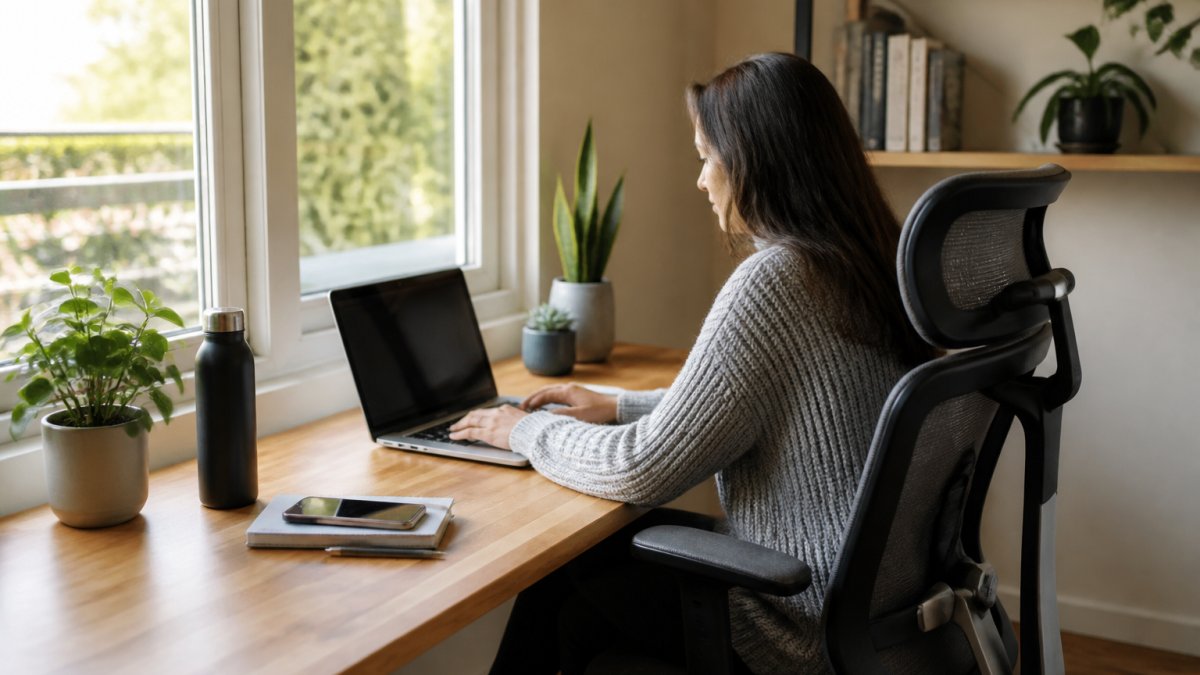
Adjust for your body, not a diagram
The standard ergonomic diagram assumes an average body. Most people aren't average in every dimension. Adjust in this order and stop when you're comfortable:
- Seat height: feet flat, knees roughly level with hips. If your desk is too low after this, raise the desk, not the chair.
- Seat depth: two to three fingers of space behind your knees. If the seat is too deep, a back cushion shortens it.
- Armrests: shoulders relaxed, elbows near 90 degrees. If armrests push your shoulders up, lower them or remove them.
- Screen height: top of the screen at or slightly below eye level. A stack of books under the monitor works as well as a stand.
- Keyboard and mouse: close enough that your elbows stay near your sides. A keyboard tray helps if the desk is too high.
Inclusive adjustments for varied bodies and mobility needs
A focus-friendly setup has to work for the person using it, including people with mobility limitations, chronic pain, or larger or smaller frames.
- Wheelchair users: check that the desk has knee clearance at least as wide as your chair and that the desk height matches your chair's armrests. A height-adjustable desk is the simplest fix; a fixed desk can be raised with bed risers if it's stable.
- Limited reach or grip: keep the items you use most within a forearm's reach, and swap a mouse for a trackball or vertical mouse if gripping is painful. Keyboard shortcuts reduce reaching.
- Low vision: a larger monitor, higher contrast settings, and a task lamp aimed at the desk rather than the screen all help. Avoid glossy screens that reflect the room.
Keep the floor clear and the cables safe
Clear floor space around the chair matters for safety as much as for focus. Route cables under the desk edge or through a clip so you're not stepping over them.
Mornings matter here too. A quick, healthy breakfast keeps your energy steady through the first focus block. If you want fast ideas, see our guide to a healthy breakfast for busy professionals.
Step 3: Clear Visual Clutter With Simple Workspace Organization Ideas
Workspace organization ideas that actually stick follow one rule: everything you touch daily stays within arm's reach, and everything else leaves the desk. Visual clutter pulls your eyes away from the screen, and every glance costs you a few seconds of focus.
Try this reset routine:
- Clear the desk surface at the end of each day
- Keep one tray for papers and one cup for pens
- Store cables in clips under the desk edge
Organizers help, but only after you've thrown things out. Buy storage last, not first.
Step 4: Tame Digital Distractions at Work
Digital distractions at work are the biggest focus killer in most home offices, and they are the easiest to fix.
Start with notifications. Turn off every alert that isn't a call or a calendar reminder.
Next, block out focus time. Set two or three deep work blocks on your calendar and treat them like meetings.
If screens still pull you in, our guide on how to reduce digital overwhelm for productivity goes deeper on cutting the noise.
Step 5: Get the Lighting and Noise Right
Lighting and noise decide whether a room feels calm or draining. Aim for natural light first, then layer in soft artificial light, then control sound. These three fixes do more for focus than any gadget.
Light: layer it in three passes
Start with daylight, then add task light, then add ambient light. Most people stop after step one and wonder why the room feels flat at 4 p.m.
- Daylight: put the desk perpendicular to the window so light falls across the desk, not into your eyes. If the screen faces the window, you get glare; if the window is behind the screen, you get reflections. Side-on is the sweet spot.
- Task light: a desk lamp with a shade that directs light onto the work surface, not into the room. Position it on the opposite side from your writing hand so your shadow doesn't fall on the page.
- Ambient light: a warm floor lamp or two small lamps beat one overhead fixture for evening work. Overhead light alone creates hard shadows and a flat, clinical feel.
A common mistake is a bright light directly behind the monitor. It turns the screen into a mirror. Move the lamp to the side or lower the shade.
Noise: find the source before you buy anything
Quiet rooms aren't a luxury. The CDC's guidance on noise and hearing explains how sustained background noise adds stress over a workday, and that stress shows up as shorter focus blocks. But before you buy acoustic panels, spend a day identifying what you're actually hearing.
Most home-office noise comes from four sources:
- Outside: traffic, lawn equipment, delivery trucks
- Inside the home: HVAC, refrigerator hum, washer and dryer, other people
- The room itself: echo off bare walls and hard floors
- Your equipment: fan noise from a laptop or desktop, keyboard clatter
Each source needs a different fix. Buying foam panels for traffic noise is wasted money; buying a rug for echo is money well spent.
Fixes that match the source
- Outside noise: close the window and seal the gap under the door with a draft stopper. Heavy curtains help more than sheer ones. If street noise still gets through, a fan or a white noise app masks it well.
- Inside-the-home noise: a bookshelf against a shared wall blocks sound better than a poster. Rugs, cushions, and curtains absorb sound inside the room. Run the dishwasher and laundry outside your focus blocks rather than fighting them.
- Echo: clap once in the room. If you hear a ring, add soft surfaces: a rug, a fabric chair, curtains, a cork board. Aim to cover roughly a third of the hard surfaces before you notice a change.
A simple way to check whether it worked
You don't need a sound meter to test this. Pick a focus task and note how many times you look up because of a sound. If the count drops after a change, keep the change. If it doesn't, the noise wasn't the problem, look at light or notifications instead.
Quiet rooms aren't a luxury. They're a health basic, and they're built from a handful of cheap fixes applied in the right order.
Step 6: Personalize Your Space for Sensory Needs
No two people focus the same way, so the last layer of setup is personal. Some people need total silence. Others focus better with low music. Some need warm light and soft textures. Others want a clean, bare desk.
Build your space around how you actually work:
- Sound: try earplugs, white noise, or low instrumental music and keep what helps
- Light: swap harsh bulbs for warm ones if bright light feels draining
- Texture: add a soft chair cushion or a wool throw if the room feels cold
This matters most for people with sensory sensitivities or attention differences. A workspace that fits your senses is easier to sit in for long stretches.
Step 7: Test Whether Your Changes Actually Improve Focus
Testing your setup is the step almost everyone skips. Without a test, you're guessing. With one, you learn which changes earn their place and which ones you can drop.
Run a simple two-week test:
- Pick one focus task you do often, like writing or planning
- Track how long you can work before you get up or check your phone
- Change one thing at a time, like lighting or notifications
One change at a time is the key. Change five things at once and you won't know what worked.
If focus still lags after a fair test, look at the basics: sleep, food, and stress. Our guides on improving mental clarity, overcoming mental fatigue naturally, and fixing low energy from chronic stress cover what to check next.
Run this simple two-week test to find out which changes actually earn their place.
| Test step | What to do |
|---|---|
| Pick a task | One focus task you do often, like writing or planning |
| Track focus | How long you work before getting up or checking your phone |
| Change one thing | One change at a time, like lighting or notifications |
| Record results | Write down the result after three days |
| Decide | Keep the change if your focus block gets longer |
Build a Distraction-Free Workspace That Fits Your Day
A distraction-free workspace isn't built in a weekend, and it shouldn't be. Start with the spot and the zones.
The hard part isn't the setup. It's keeping it. Clutter creeps back, notifications return, and the desk becomes a shelf again.
At Roxberry Juice Co., we make the food side of focus easier.
Get started with Roxberry Juice Co. and give your focus the fuel it needs.
Frequently Asked Questions
How do I set up a workspace that helps me focus?
Start with the physical basics: a desk you can sit at comfortably, a chair that supports your back, and light that does not glare off your screen. Then remove what pulls your attention away, including paper piles, phone notifications, and background noise. Keep only the tools you use daily within arm's reach. A focus-friendly workspace is less about buying things and more about removing friction, so you can sit down and start on your high-priority task without a warm-up period.
What should I remove from my desk to reduce distractions?
Clear anything you do not touch during a normal work session. That usually means stacked mail, old coffee cups, charging cables for devices you are not using, and decorative items that crowd your line of sight. Keep your screen, keyboard, mouse, a notebook, and one glass of water. Put everything else in a drawer or a nearby bin. A clear desk surface gives your eyes fewer places to wander, which makes it easier to stay on one task.
How can I reduce noise while working from home?
Close the door first, then soften the room. Rugs, curtains, cushions, and bookshelves absorb sound and cut echo. If noise still gets through, a pair of foam earplugs or noise-canceling headphones handles most household and street sound. For calls, a microphone with a directional pickup keeps your voice clear without raising it. Test one change at a time so you know which fix actually helped.
How often should I take breaks to maintain focus?
A common pattern is 50 minutes of focused work followed by a 10-minute break, or 25 minutes on and 5 off if you are building the habit. Stand up, look at something far away, and move your body during the break. Step outside if you can. Pair the break with water or a fresh juice instead of another coffee, and keep the break short enough that returning to your desk still feels easy. Adjust the interval until it matches how long you can actually concentrate.